Copy Paste Online – Move Text Between Devices Instantly
Easily copy and paste online text between different devices and browsers instantly. Fully secure and privacy first copy paste online tool on the internet. No signup/login required.
Create New Text
How Copy Paste Online Works
Using this online copy paste tool is simple. You can create and share text in three easy steps.
-
Write or Paste Your Text
Add your text in the text box. It can be a short message, long note, code, paragraph, list, or any plain text you want to move or share. Max 100000 characters allowed.
-
Choose Expiry Time
Select how long your text should stay available. You can choose from options like 1 hour, 24 hours, 7 days, or 30 days.
After the selected time, the text is automatically expired and removed. -
Create and Share Your Links
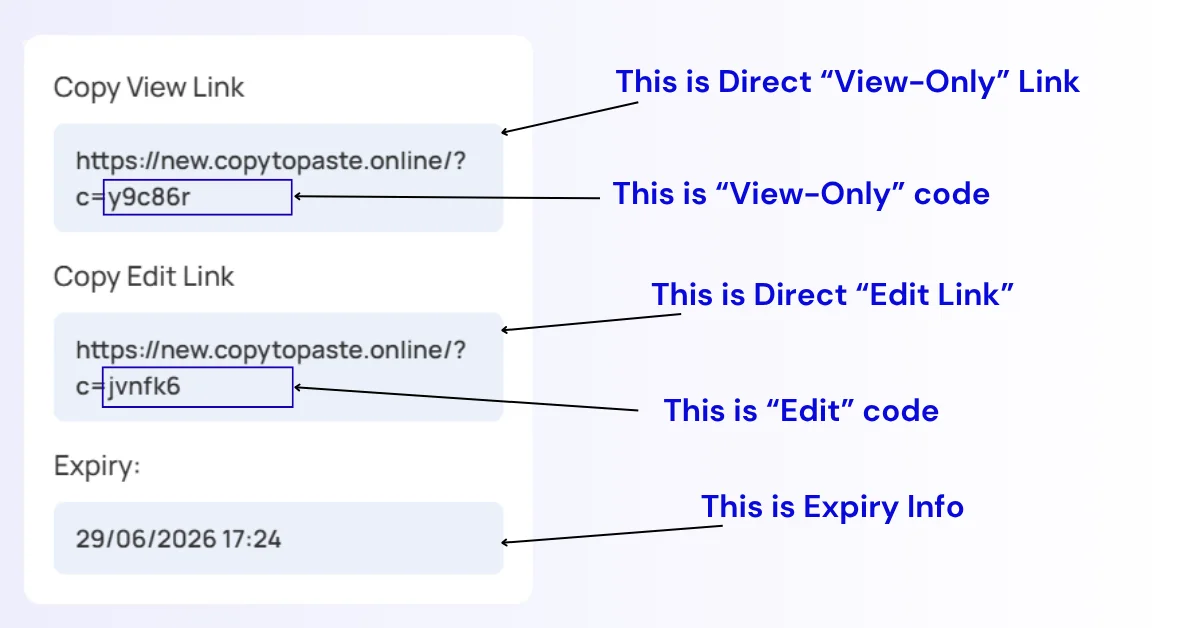
Click the create button and the tool will generate your View Link and Edit Link.
Use the View Link to open the text on another device or share it with someone. Keep the Edit Link private if you want to update the text later.
You can also use the short code or QR code for quick access on mobile devices.
Copy and Paste Text Across Devices
This tool is made for situations where you have text on one device but need it on another.
For example, you may write something on your laptop and need it on your phone. You may copy a message on mobile and want to open it on desktop. You may have a code snippet on one browser and need it in another. Instead of sending the text to yourself through email or chat, you can create a link and open it anywhere.
Copy Paste Online works for:
- phone to laptop
- laptop to phone
- tablet to desktop
- one browser to another browser
- Windows to Mac
- Android to iPhone
- personal device to work device
As long as the device has a browser, your text can be opened through the link or code.
Why Use Copy Paste Online?
Copy Paste Online is built for speed, simplicity, and control. You do not need to install an app, create an account, or connect your devices. You only need a browser and your generated link or code.
The tool is useful when you want to:
- move text between devices quickly
- share text without giving edit access
- create a temporary text link
- update shared text later
- download shared text from the view page
- scan a QR code and open text on mobile
- avoid sending long text through messaging apps
- use a simple copy paste website without login
It is not made to replace full document tools. It is made for quick text transfer and temporary text sharing when you want the job done fast.
Privacy and Expiry
You do not need to provide your name, email, phone number, or account details to use this tool. Your text is accessed through the links and codes generated by the tool.
You can also choose an expiry time before creating your text. Once the selected time is over, the text expires and is removed automatically.
Because this is a link-based tool, anyone with the View Link can view the text, and anyone with the Edit Link can edit it. So only share your links with people you trust, and keep the Edit Link safe.
For highly sensitive information like bank details, private passwords, legal documents, or personal identity data, use extra care. This tool is best for normal text transfer, temporary sharing, notes, drafts, code snippets, and everyday copy paste tasks.
Use QR Code for Faster Mobile Access
When you create your text, the tool also creates a QR code. This is useful when you want to move text from desktop to mobile without typing the link manually.
Just create the text on one device, scan the QR code with your phone, and open the View Link quickly.
This makes the tool more useful for phone-to-laptop and laptop-to-phone text transfer.
Need More Than One Text Item?
This Copy Paste Online tool is best when you want to share one main text item with a View Link and Edit Link.
If you want to save or share multiple text items in one place, use our Online Clipboard tool. It works with the same simple idea but allows multiple text items in one clipboard session.
You can also use our other free tools for text work:
- Online Clipboard
- Case Converter
- HTML Encoder / Decoder
- URL Encoder / Decoder
- Base64 Encoder / Decoder
These tools are made to help with quick text editing, formatting, encoding, decoding, and sharing tasks.
View Link and Edit Link: Better Control Over Shared Text
A normal copy paste website usually gives you one link only. That works fine until you need to change something. If you notice a mistake or want to update the text, you often have to create a new link and send it again.
Copy Paste Online solves this with two separate links.
The View Link is for the person who only needs to see the text. They can open it, copy it, or download it, but they cannot change the original content.
The Edit Link is for the person who created the text. With this link, you can update the text later while keeping the same View Link active.
This is the most useful part of the tool. You can share one view-only link with someone, then edit the text later without breaking the link or sending a new one. It is helpful for instructions, drafts, temporary notes, code snippets, client text, classroom text, or any information that may need small updates.
For safety, share the View Link with others and keep the Edit Link private.
The useful thing is that your View Link stays the same. So if you already shared the View Link with someone, you do not need to send a new one after editing. They can open the same link and see the updated text.
This is helpful for sharing instructions, temporary notes, code, drafts, updates, or any text that may need changes later.
- No login or signup required.
- Fully anonymous, no personal data is collected.
- Fully privacy-oriented.
- Access and Edit mode feature, which puts you in full control of your text. This feature doesn’t Exist on entire web. Update and sync your text without changing or breaking the codes. Perfect for sharing with someone else or for personal text sync across devices and browsers.
Frequently Asked Questions (FAQs)
-
What is Copy Paste Online?
Copy Paste Online is a free online tool that lets you paste text, create a link, and open that text on another device or browser. It helps you move and share text without signup or installation.
-
Is this a free copy paste website?
Yes. You can use this copy paste website for free. You do not need to create an account or log in to create and share text.
-
What is the View Link?
The View Link is used to open, copy, or download the shared text. It is best for people who only need to read or use the text without changing it.
-
What is the Edit Link?
The Edit Link allows the text creator to update or change the text later. The useful thing is that the View Link stays the same, so you do not need to send a new view link after every edit.
-
Can I edit the text after sharing it?
Yes. Use your Edit Link to update the text. After editing, the same View Link will show the updated content.
-
How long does my text stay available?
Your text stays available until the expiry time you choose. Current options include 1 hour, 24 hours, 7 days, and 30 days.
-
Do I need to install anything?
No. This tool works in the browser. You can use it on phone, laptop, tablet, or desktop without installing any app.
-
What is the text limit?
You can create and share up to 100,000 characters in this tool. This is enough for most notes, messages, drafts, code snippets, and text blocks.
-
Can I share multiple text items?
This page is for one main text item at a time. For multiple text items, use the Online Clipboard tool.
-
I lost my View Link or Edit Link. Can I recover it?
Because the tool does not use login or email, we cannot recover lost links for you. You can check your browser history, because the created link may still be saved there. But if you used private or incognito mode, it may not be available in your history.
Start Using Copy Paste Online
Use the tool above to paste your text, choose expiry time, and create your View Link and Edit Link. It is a simple way to copy paste online, move text between devices, share view-only text, and update your content later without sending a new link.
Help Us Improve
If you have any valuable insights about copy paste online and sync tool, would love to share your feedback or found any bug, please feel free to reach out to us.