
Finding a real time clipboard that actually works across all your devices can feel like a chore. We have all been there: you find a great link on your phone, but you need it on your laptop. Or, you write a long message on your tablet and want to paste it into a document on your computer. Usually, you end up emailing yourself or using a messaging app, which is slow and messy.
That is exactly why we built iClipboard. We wanted a real time clipboard that felt like magic—something that lets you move text from one screen to another without any lag or complicated setup. In this post, we want to show you how a digital clipboard can change the way you work and why privacy should always come first.
The Problem with Traditional Text Sharing
Before we talk about how a real time clipboard works, let’s look at why the “old ways” are frustrating.
- Emailing Yourself: It fills up your inbox with “junk” messages that have no subject line.
- Messaging Apps: If you use a chat app to send notes to yourself, you are often leaving your personal data on someone else’s server.
- Syncing Apps: Many apps require you to log in on every device. If you are using a public computer or a friend’s laptop, you don’t want to log into your personal accounts.
A real time clipboard solves all of this. It acts as a temporary bridge. You don’t need an account, and you don’t need to stay logged in. You just move your text and get back to work.
How to Use Our Real Time Clipboard (Step-by-Step)
We designed iClipboard to be used by anyone, even if you aren’t a “tech person.” The process is fast and focuses on getting your text where it needs to go.
- Step 1: Enter Your Text: Visit our Tool Page and paste your text into the box. This can be a link, a paragraph, or even a list of items.
- Step 2: Get Your Secret Key: Click the button to create your text. Our real time clipboard will immediately give you a short, unique code. This code is your “key” to your data.
- Step 3: Open on Another Device: Go to any other device—a phone, a tablet, or a different PC. Open the site and enter that code.
- Step 4: Use Your Text: Your text appears instantly. From there, you can copy it, download it as a text file, or even edit it and save the changes so the other device sees the update too!
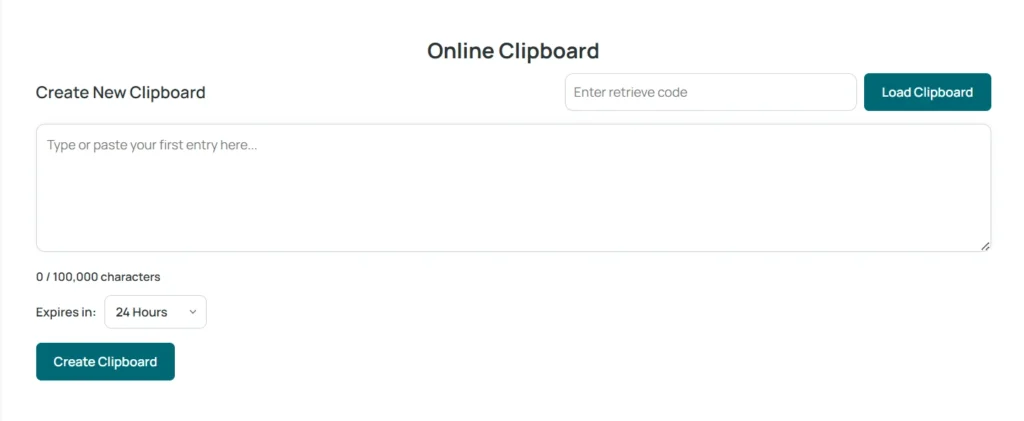
Try it now: If you have text ready to move, head over to the iClipboard Home Page and see how fast it works!
Why iClipboard is Better: Security and Privacy
When you use a real time clipboard, you are putting your information into a website. Most people worry about where that data goes. I built this tool with a “Privacy First” mindset.
No Logs, No Tracking
Most websites track your every move. They want to know who you are and what you are typing. We don’t do that. Our system does not keep “logs” of your activity. We don’t track your location or your identity.
Fully Secure
We use encryption to make sure that while your text is moving from Device A to Device B, no one else can see it. It is a private tunnel for your information. Once your text expires or is deleted, it is gone from our system forever. This makes iClipboard a truly secure real time clipboard for your daily needs.
Useful Ways to Use a Real Time Clipboard
If you aren’t sure how this tool fits into your daily life, here are some common ways our users stay productive:
1. Moving Links for School or Work
If you find a research paper on your phone while riding the bus, just save it to the clipboard. When you get to your desk, enter the code and start writing.
2. Copying Code Snippets
For people building websites, moving a small piece of code can be annoying. A real time clipboard ensures that the code stays exactly as you wrote it, with no weird formatting errors that sometimes happen in emails.
3. Quick Text Editing
Because you can “Update” the text once it is retrieved, you can use iClipboard as a temporary workspace. Start a list on one device, update it on another, and finish it on a third.
Frequently Asked Questions
Is this real time clipboard free?
Yes! You can use the tool as much as you want without paying a cent. We want everyone to have access to easy text sharing.
Do I need to install any software?
No. This is a web-based tool. It works in any browser like Chrome, Safari, or Firefox. This is what makes it a “real time” solution—there is nothing to wait for.
Can I use this on my iPhone and my Windows PC?
Absolutely. It works across all operating systems. As long as the device has internet, the real time clipboard will work.
What is the Catch?
People often ask us, “If it’s free and secure, how do you keep it running?”
There is no “catch” or hidden agenda. We don’t sell your data and don’t show you annoying pop-up ads. However, keeping the servers running does have a small cost.
If you find this real time clipboard helpful and it saves you time, a small donation can help a lot. It allows us to keep the tool fast and free for everyone. If you are interested in helping out, or if you just want to give us some feedback on how to make the tool better, please visit our contact page to enquire about donations.
Final Thoughts
Technology should be simple. You shouldn’t have to jump through hoops just to move a bit of text from your phone to your computer. By using a real time clipboard, you cut out the middleman and get your work done faster.
I invite you to try iClipboard today. Bookmark Us so the next time you are struggling to send a link to yourself, you can do it in seconds instead of minutes.